MEPCO Bill Online Check – Download Duplicate Bill (2026)
Checking your MEPCO bill online is simple once you have your Reference Number or Customer ID ready. This guide walks you through the exact steps, explains what each part of your bill means, and answers the questions most consumers ask.
or
How to Check Your MEPCO Bill Online
After you submit your Reference Number or Customer ID, the bill-checking service will display the available bill details.
If you’re holding an old paper bill, note down the Reference Number somewhere safe. You’ll need it every time you check your bill, so it saves time later.
Where to Find Your Reference Number
The Reference Number is a 14-digit code tied to your electricity connection. It’s usually printed near the top section of your bill, close to your name and address.
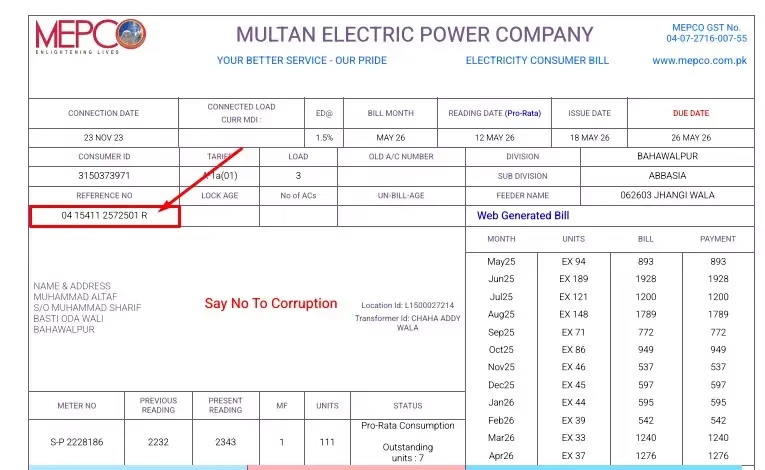
Example: The highlighted number shows where to find the 14-digit Reference Number on a MEPCO bill.
When entering it above, double check every digit. Even one wrong number will stop the system from finding your bill.
Checking With Your Customer ID Instead
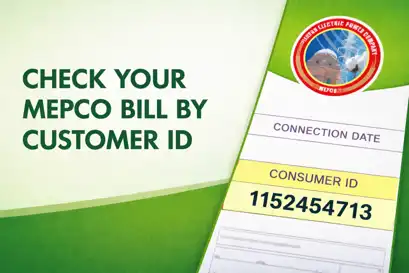
Don’t have your Reference Number handy? The 10-digit Customer ID works too, and it’s printed close to the Reference Number on your bill.
Type it into the second box above and tap Check Bill. You’ll be able to view the available bill details and use the available download or print option, if provided.
What Shows Up on a MEPCO Bill
A standard MEPCO bill covers everything from your usage to what you owe. The exact layout can shift a little depending on your connection type, but most bills include:
- Consumer name and address
- Reference Number and Customer ID
- Previous and current meter readings
- Units consumed
- Bill issue date and due date
- Amount payable, plus any arrears
- Taxes and applicable charges
- Late Payment Surcharge, if it applies
Before you pay, glance over the meter reading and units consumed. If something looks off compared to your usual bill, hold onto it and compare with a previous month’s bill.
When a Bill Looks Wrong
If a reading or charge doesn’t add up, start by comparing your current bill with your last one.
If you’re confident there’s a genuine error, our MEPCO bill correction guide walks through what to do next.
About MEPCO
Multan Electric Power Company (MEPCO) is a public electricity distribution company serving consumers in Southern Punjab, Pakistan.
MEPCO was incorporated on May 14, 1998, as part of the restructuring of Pakistan’s power sector. (Source: PACRA rating report on MEPCO)
Frequently Asked Questions
Q1: How do I check my MEPCO bill online?
Enter your Reference Number or Customer ID in the tool above and tap Check Bill. Once it loads, you can view the available bill details and use the download or print option if provided.
Q2: Is checking my bill here safe?
The bill-checking form on this page asks for your Reference Number or Customer ID. Never enter your CNIC, password, OTP, or other sensitive information unless it is clearly required by the official service.
Q3: My bill isn’t showing up. What now?
Recheck every digit you entered. If the numbers are correct but the bill still won’t load, wait a while and try again, or contact MEPCO’s helpline at 118 or 0800-63726.
More MEPCO Guides
Information Sources
Information on this page is based on publicly available information from MEPCO, PITC, NEPRA, and other relevant official sources. Official procedures and charges can change, so check the latest information before taking action.
About This Website
MEPCO Online is an independent informational website. We are not affiliated with Multan Electric Power Company (MEPCO), the Government of Pakistan, or any electricity distribution company.
We provide general information to help consumers understand MEPCO bills, billing procedures, and related services. Where possible, we refer users to official sources for current tariffs, policies, contact information, and procedures.
Information on this website may change when official rules, tariffs, or procedures are updated. Always verify important billing and service information with the relevant official authority.
About the Author
Written by Altaf, who tracks and documents Pakistani utility billing systems. Content is reviewed and updated regularly to reflect current procedures. Last updated: October 2026.