MEPCO New Connection – Apply Online, Documents & Procedure 2026
If you need a new electricity connection for a house, shop, office or other property, you can apply through the official Electricity New Connection (ENC) system.
You’ll submit your details along with the required documents. The application then goes through verification and site assessment. If a demand notice is issued, follow the payment instructions to complete the process.
MEPCO offers different connection categories for domestic, commercial, industrial and agricultural consumers. Requirements and charges vary depending on your connection type and applicable tariff category.
How to Apply for a New MEPCO Connection
You can start your application through the official ENC system.
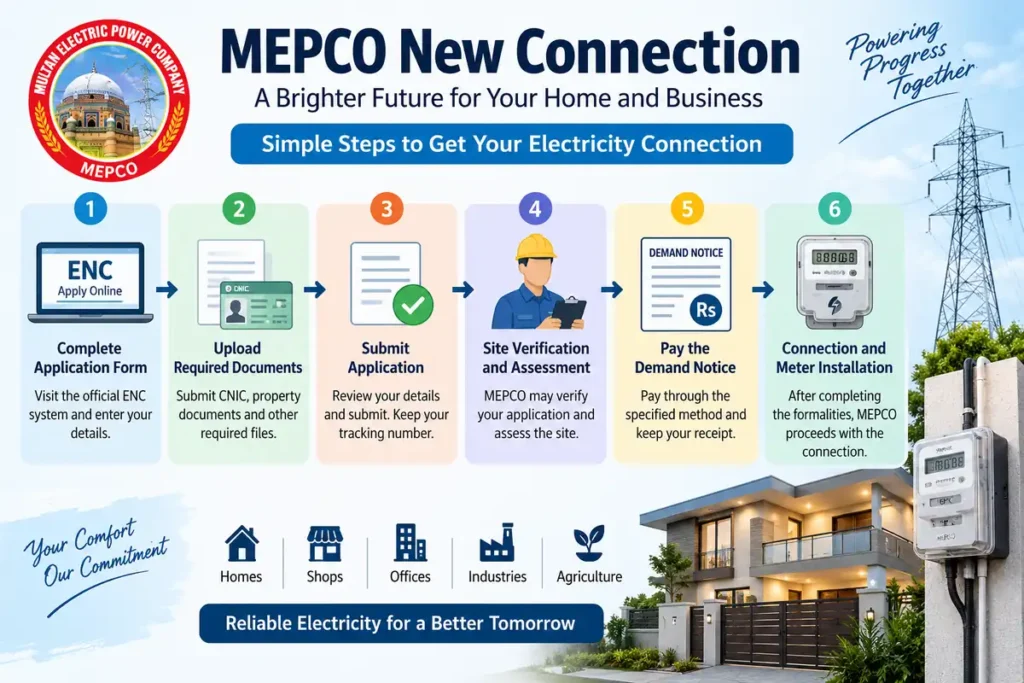
Step 1: Complete the Application Form
Enter your personal information, property details and connection information as requested in the ENC form.
Step 2: Upload the Required Documents
The documents required for a new connection depend on the connection type and your circumstances. Commonly requested documents may include:
Always check the current ENC application instructions before uploading documents, since requirements can vary by case.
Step 3: Submit the Application
Review your details carefully, then submit through the ENC system. Keep a copy of your application and tracking number for your records.
Step 4: Site Verification and Assessment
MEPCO may verify your application and assess the site before approving the connection. Any estimate or demand notice will be issued according to the applicable process.
Step 5: Pay the Demand Notice
If a demand notice is issued, pay it through the method MEPCO specifies and keep your receipt safely. For ongoing bill payments once your connection is active, see our MEPCO Bill Payment Methods guide.
Step 6: Connection and Meter Installation
After the formalities and payment are complete, MEPCO proceeds with the connection and meter installation.
MEPCO New Connection Fee
There’s no single fee for every connection. The amount depends on the connection category, sanctioned load, location and the work required at your site.
After application and assessment, MEPCO issues a demand notice showing the exact amount payable. Treat any figure in an online guide as general information only. The demand notice is what you should follow.
Before paying, check the applicant name, connection category and amount on the notice.
Processing Time
Processing time varies from one application to another, depending on the connection category, site conditions, verification and office workload. There’s no fixed timeline that applies to every case.
If your application is taking longer than expected, use your tracking details to check its status, or contact MEPCO customer support.
Tracking Your Application
Keep the tracking or application number you received during submission. You can use the ENC tracking facility to check progress.
If your status isn’t updating or you can’t find it, reach out with your application details. Avoid sharing your CNIC or personal information publicly when asking for help.
Types of MEPCO Connections
- Domestic — for homes and residential properties.
- Commercial — for shops, offices and business premises.
- Industrial — for factories and industrial facilities, with requirements depending on load and nature of use.
- Agricultural — for eligible farming and tube well related electricity needs.
Your applicable category, tariff and requirements should be confirmed during the application process.
Frequently Asked Questions
Q1: How can I apply for a MEPCO new connection?
Apply through the official ENC system. Select MEPCO, choose your connection category, and upload the required documents.
Q2: What documents are required?
Common requirements include the applicant’s CNIC and proof of ownership or legal occupancy. Check the current ENC requirements before applying, since they can vary by category.
Q3: How much does a new connection cost?
There’s no fixed fee. The amount depends on your connection category, load and site requirements, and is confirmed on the demand notice MEPCO issues.
Q4: How can I track my application?
Use the tracking or application number you received at submission through the ENC tracking facility.
Official Sources
- Electricity New Connection (ENC): official application and tracking system
- MEPCO: official distribution company information
- Consumer Service Manual: new connection procedure and requirements
Once your connection is active, you can estimate your monthly bill using our MEPCO Bill Calculator.
Related MEPCO Services